In 2026, still sending your link to every Instagram commenter by hand?
26 August 2026 · 8 min read
The reel did well. Two hundred and forty people commented the word you asked for. And now you are on your bed, thumb aching, pasting the same link for the ninety-first time, with a sinking feeling that the first forty have already lost interest.
Here is the frustrating part. That reel worked. The demand showed up exactly the way you hoped. The only thing standing between those comments and actual money is a job that a computer should have done in the four seconds after each one landed. So let us fix that today, properly, in about five minutes.
Why replying to every comment by hand breaks down

It is not the typing. It is the speed you cannot possibly hit. A comment is worth the most in the first minute, while the person is still on your post and still curious. Six hours later they are not a warm lead, they are somebody who asked a question and got nothing, and quietly decided you are the kind of creator who does not reply.
Then there is the honest arithmetic nobody puts in a course. Doing this by hand caps your reach at whatever your thumbs can survive. Your best reel becomes the one you dread, because a hundred extra comments is a hundred extra chores. There is something quite sad about a creator hoping a post does not go too well.
How Instagram comment to DM automation works
The mechanic is simple. Someone comments the word you chose. Within seconds, a DM lands in their inbox with your link in it. They tap, they land on your storefront, they pay, and the product is delivered without either of you doing anything else.
I know the objection, because everyone has it. My audience will smell a bot and it will feel cold. Two things there. The first is that people are not annoyed by speed, they are annoyed by robot voice, so you write the DM in your own words and it reads like you. The second is that the alternative is not warm and personal, it is six hours of silence followed by a paste. Instant and honest beats slow and apologetic.
One serious note before the setup, because it matters more than any feature. Only use automation that runs on Meta's official Instagram API, which is what this is. Tools that log in as you and click around behind the scenes are breaking Instagram's terms, and the account they eventually get restricted is yours, not theirs.
How to set up comment to DM on Creatly, step by step
Step 1: Connect your Instagram account
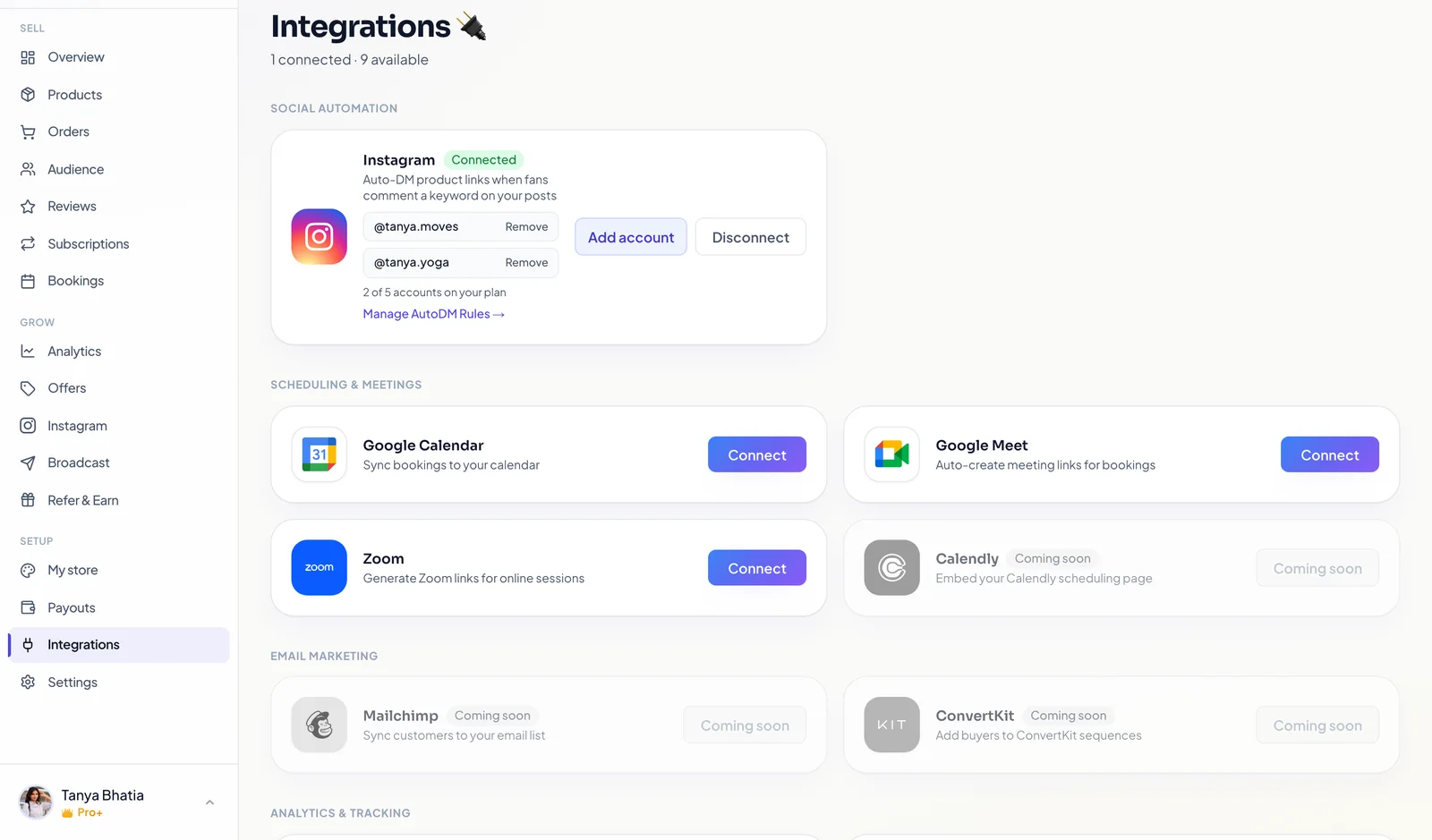
Go to Integrations and connect Instagram. You log in through Instagram's own screen, so Creatly never sees your password. Once it is connected you can jump straight to the rules from here.
Step 2: Choose what the automation listens to
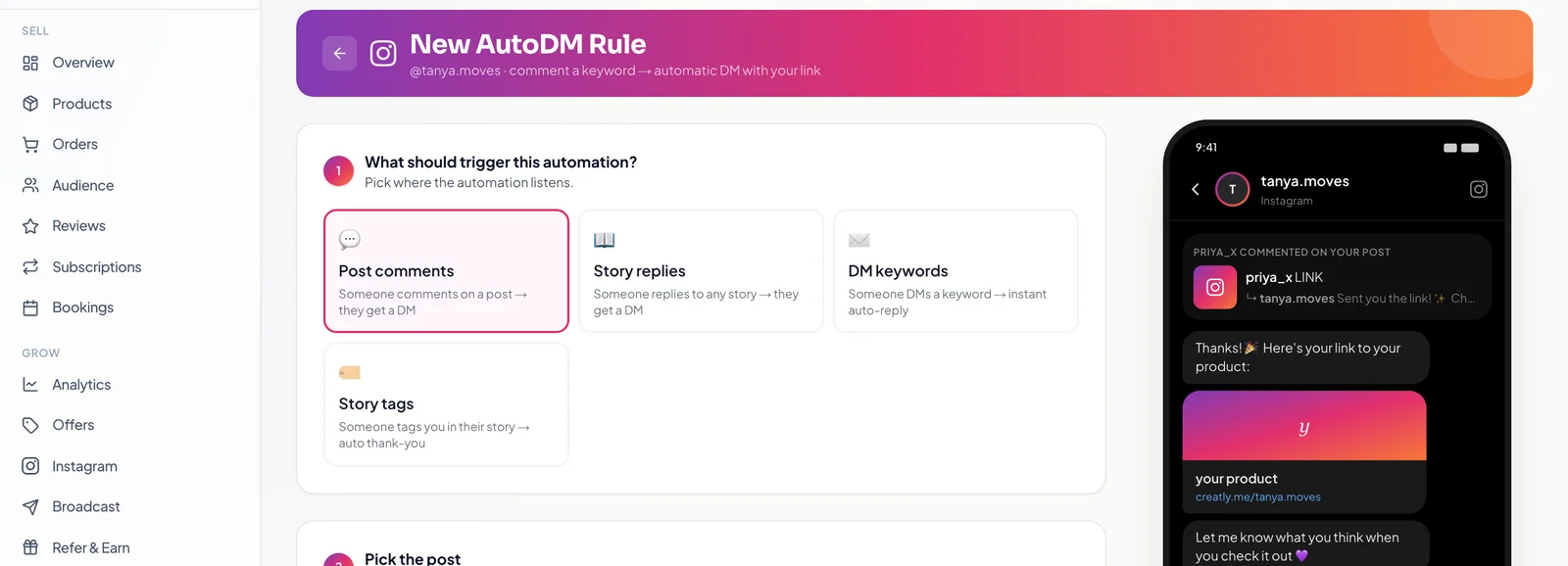
Create a new AutoDM rule and pick the trigger. Post comments is the one this article is about. Story replies and DM keywords are the same idea in different places, and story tags sends an automatic thank you when someone tags you, which is a nice thing to have running quietly in the background.
Step 3: Pick the post and set your keyword
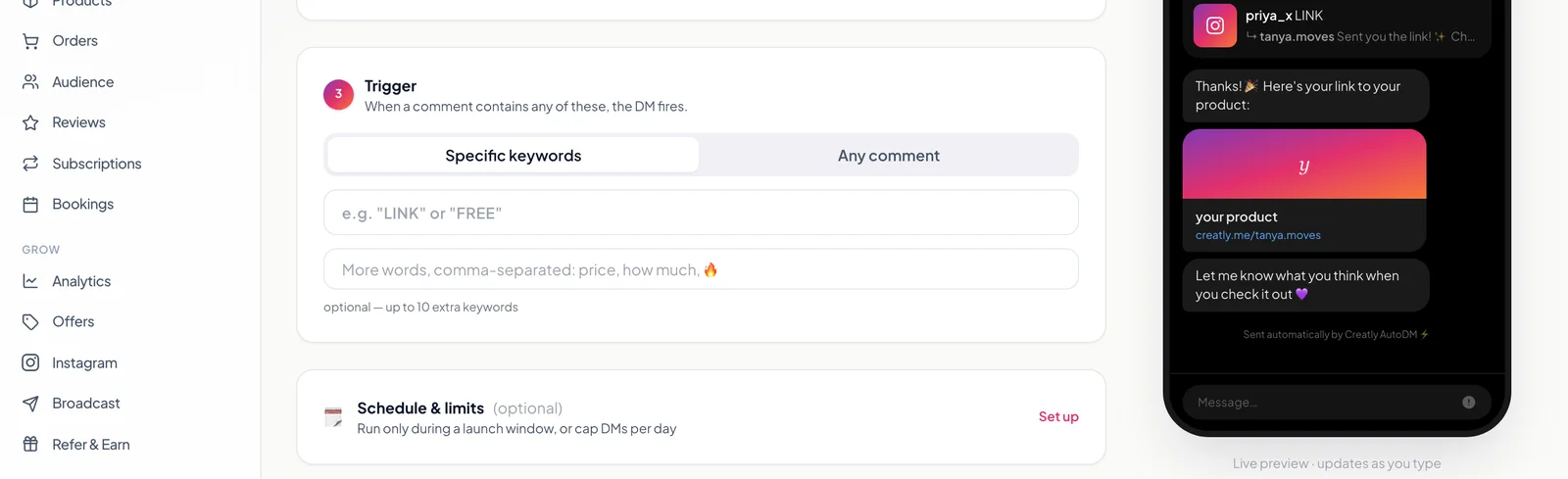
Choose the post or reel to watch, then decide what fires the DM. Specific keywords keeps it deliberate. Any comment fires on every comment, which is right for a reel where you asked a question instead of naming a word. Add the variants people actually type, because someone will comment “price” and someone else “PRICE?” and both of them mean give me the link.
Step 4: Attach what you are actually selling
Tick the product whose link should go in the DM. This is the step that separates this from a plain DM bot: the link is a real checkout for a real product, not a page you still have to talk somebody through. Custom links work too, for a YouTube video, a form or a calendar.
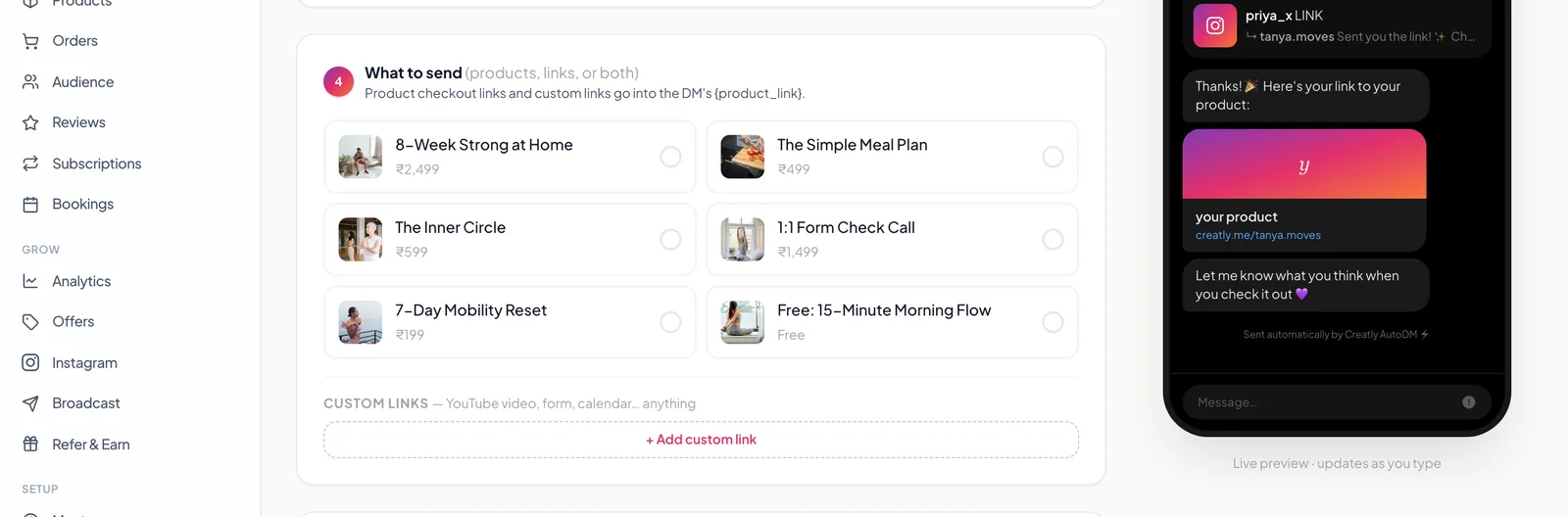
Step 5: Write the DM in your own voice
Type the message the way you would type it to one person, and drop in the placeholders for the product link, the product name and their username. You can send plain words or a swipeable product card. Add a few public comment replies too, so the thread under your post has some variety rather than the same sentence forty times in a row, and switch it on.
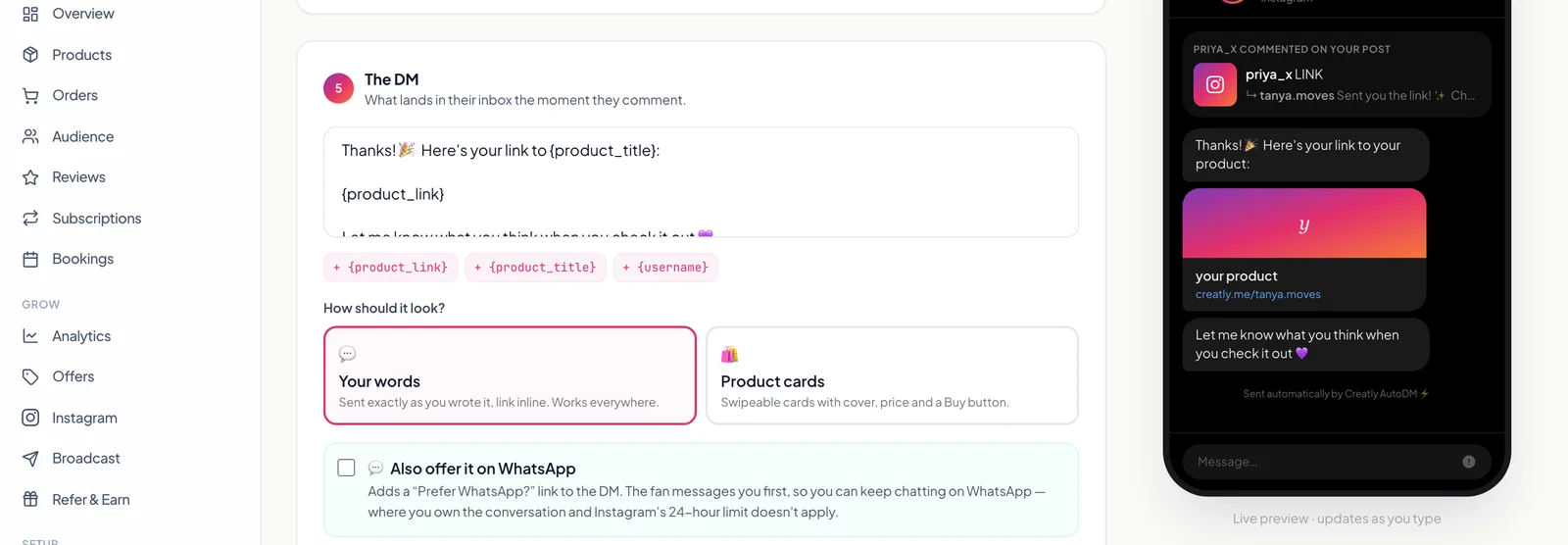
Step 6: Post the reel and leave it alone
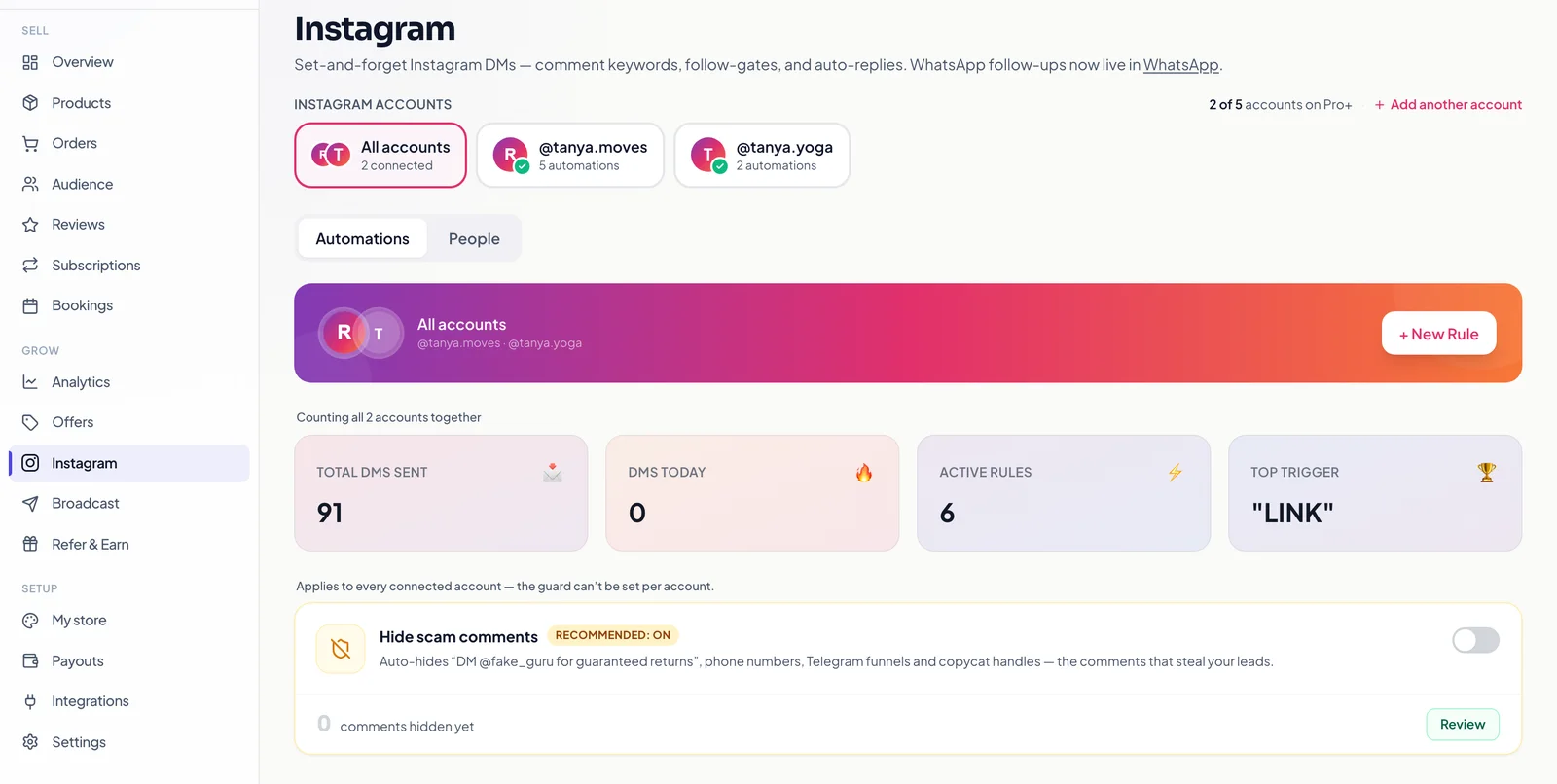
That is the whole setup. From here the rule watches, answers and counts. The dashboard shows how many DMs went out and which keyword is doing the work, so you learn which post earned rather than only which post got likes.
What the person who commented actually sees
Their side is the half that decides whether any of this earns. They comment, and before they have scrolled away the DM is there with your link. They tap it and land on the product page, with the price, what they get, and a pay button. They pay by UPI, card or EMI, and the file or the course access arrives immediately.
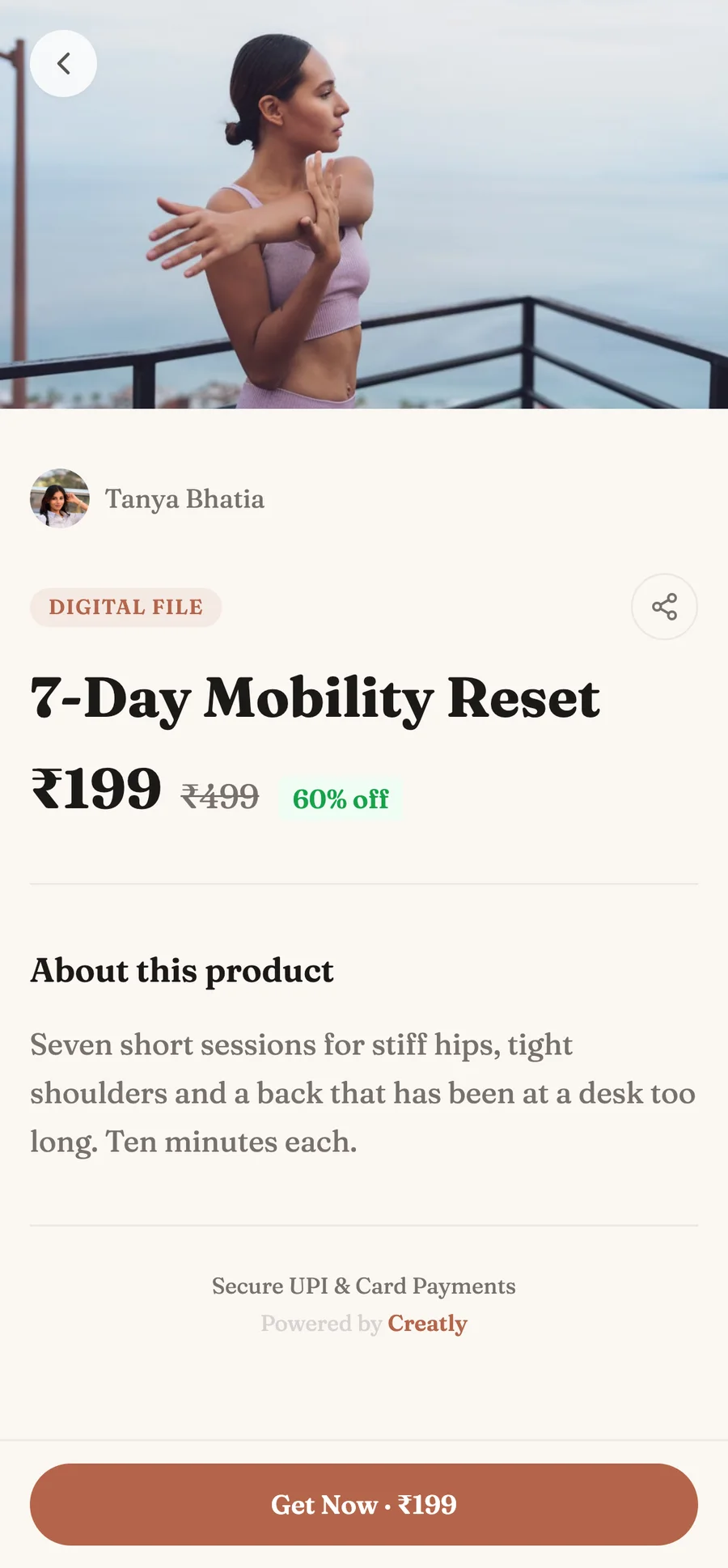
They also get a Creatly account with that purchase, so when they lose the file in three weeks they log in and download it again instead of messaging you at 11pm. Small thing. It is the difference between selling something once and running a shop.
The first night you leave it switched on
You post the reel and then, out of pure habit, you keep opening Instagram to check the comments. Forty of them. Normally that is your evening gone. Tonight the little green dot says every one of them already has your link.
Then a payment notification arrives while you are eating dinner, from someone whose comment you never even read. That is the moment the thing clicks. You did not become a worse creator by automating this. You just stopped being the bottleneck between people wanting your work and being able to buy it.
What comment to DM automation costs on Creatly
The Free plan includes one automation on one Instagram account, forever, with no card required and no trial timer. That is enough to run the exact setup in this article on your best post and find out whether it earns.
Pro at ₹499 a month is where it stops being one automation. It makes them unlimited across two Instagram accounts, and adds the follow gate that grows your following before the link goes out, DM sequences that follow up with people who opened but did not buy, the scam comment shield on every post rather than one, and reporting on who opened, clicked and bought per rule. Pro+ at ₹999 a month raises that to five accounts. Full numbers are on the pricing page.
Frequently asked questions
How do I set up comment to DM on Instagram?
You need three things connected: your Instagram account, a rule that watches one post for a keyword, and a link worth sending. On Creatly you connect Instagram through Meta's own login, create an AutoDM rule, choose the post, type the keyword, attach the product, and switch it on. It takes about five minutes and the DM starts landing within seconds of the next comment.
Is Instagram comment to DM automation allowed?
Yes, when it runs on Meta's official Instagram API, which is how Creatly connects. You log in through Instagram's own flow and nobody ever asks for your password. What gets people into trouble is unofficial tools that automate a logged-in session, because that genuinely does breach Instagram's terms.
How fast does the DM arrive after someone comments?
Seconds, which is the entire point. The value of a comment decays fast: the person is looking at your post right now, and in ten minutes they are three reels away and have forgotten they asked. Every comment event Instagram sends is written to a durable queue and retried until it is processed, so a busy reel does not mean some people quietly get nothing.
Can I automate replies to any comment, not just a keyword?
Yes. The trigger has two modes. Specific keywords fires only when the comment contains one of the words you listed, which keeps it deliberate. Any comment fires on every single comment on that post, which suits a reel where you have asked a question rather than named a keyword. You can also add up to ten extra keyword variants, which matters because people type PRICE, price and Price and mean the same thing.
Will my followers know it is automated?
They will know something answered them instantly, and in our experience they like that. What breaks the spell is a robot voice, so write the DM the way you actually talk, and rotate a few public comment replies so the thread under your post does not read like the same sentence forty times. Creatly picks one variant at random per comment for exactly that reason.
Do I need a paid plan for Instagram comment to DM?
No. The Free plan includes one automation on one Instagram account, forever, with no card and no trial timer. Pro at ₹499 a month makes automations unlimited across two accounts and adds the follow gate, DM follow-up sequences, the scam comment shield on every post, and per rule reporting on who opened, clicked and bought.
What happens after the DM, does the sale still need me?
No, and this is the part most DM tools stop short of. The link in the DM opens your Creatly storefront, the buyer pays by UPI, card or EMI, and the product is delivered the moment payment clears. They also get a buyer account so they can re-download without messaging you. You find out from the sale notification, not from doing the work.
Set it up on one post today, the one that always gets the “link?” comments, and see what a week looks like when nobody has to wait for you.
Start with the free automation →
The full Instagram setup, without a website →
Turning those buyers into a paid community →
Every AutoDM feature in depth, with screenshots →