In 2026, still managing your paid Telegram group manually?
24 August 2026 · 8 min read

Yes, you. The one squinting at a payment screenshot at 11pm, matching a random UPI name to a Telegram username, adding members one at a time, and keeping a spreadsheet that died quietly in week three. If that stung a little, good. Because none of that is the actual work. Your community is the work. The admin is a tax you have been paying for not automating it, and here is the thing about that tax. It feels fine at ten members and it eats your evenings at fifty.
So let us have the conversation you have been putting off. What would it take for the payments, the joins and the removals to run without you? About ten minutes, honestly. Stay with me.
Why manual Telegram group management breaks down

You are not lazy and you are not disorganised. Manual community management simply breaks in four specific places, and every creator who has run a paid group knows each of them personally.
- Verifying payments by screenshot. Screenshots can be edited, payments can be reversed, and matching a payer name to a Telegram username is guesswork. You are the fraud check, and you are doing it one DM at a time.
- Adding members by hand. Someone pays during your workday, joins six hours later, and their first experience of your paid community is waiting. Every join is your time.
- Tracking who expires when. Monthly members who joined on twenty different dates means twenty different renewal dates. The spreadsheet is stale within a month, and you know it.
- Removing people who stopped paying. This is the one nobody does. Chasing a lapsed member feels awkward, so expired members sit in the group for months, and the people who do pay are subsidising the ones who quietly stopped. Your recurring revenue leaks from exactly the place you cannot see.
Sound familiar? Then hear this clearly. None of it is a content problem. Your community is probably great. It is an operations problem, and operations is precisely the thing software should be doing for you.
How automated Telegram membership works
On Creatly, a paid Telegram community is a product on your storefront, the same as an ebook or a course. The loop runs like this. A buyer pays on your store page, by card or UPI, and the moment payment clears they get their personal invite into your Telegram group. Razorpay charges the renewal at the end of whichever billing cycle they chose, and they get a reminder 7 days before so the renewal does not fail by accident. If they stop paying, their access ends and the bot removes them from the group on its own. If the payment recovers, they are re-admitted instantly. You never verify a screenshot, never add anyone, never remove anyone, and never have that awkward conversation.
Now, I know what you are thinking. My members will not like a bot. Here is the truth, they never talk to it. The bot only opens the door when someone pays and closes it when they stop. The thing your members actually pay for, which is you and the community you run, does not change at all.
And the part that changes your revenue is the removal. Once lapsed members actually leave, a membership stops being a one time donation with lifetime access and becomes real recurring income.
How to set up a paid Telegram group, step by step
Step 1: Create a membership product
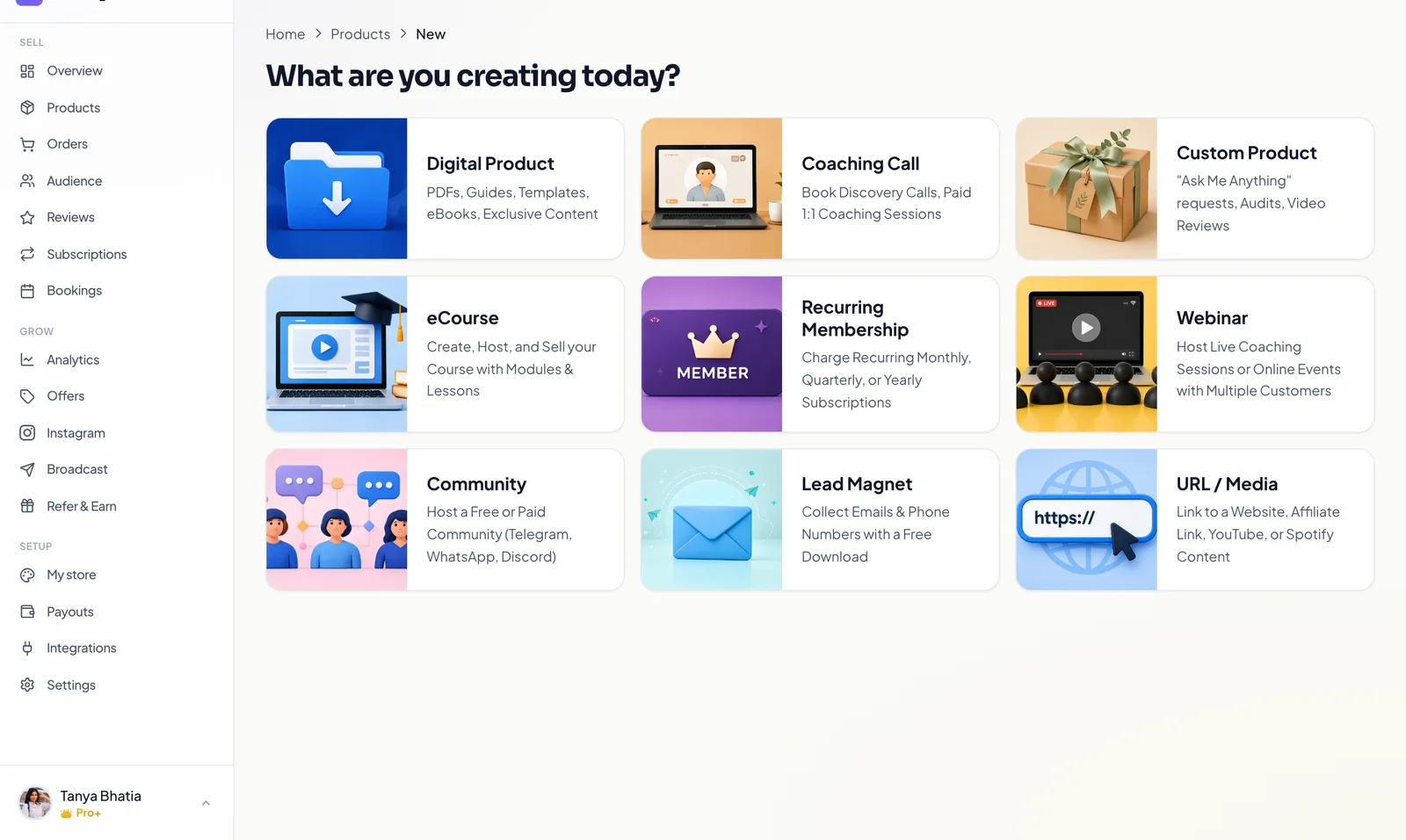
From your dashboard, go to Products, then New, and pick Recurring Membership. This creates a product that charges on a cycle instead of once.
Step 2: Set your billing cycles
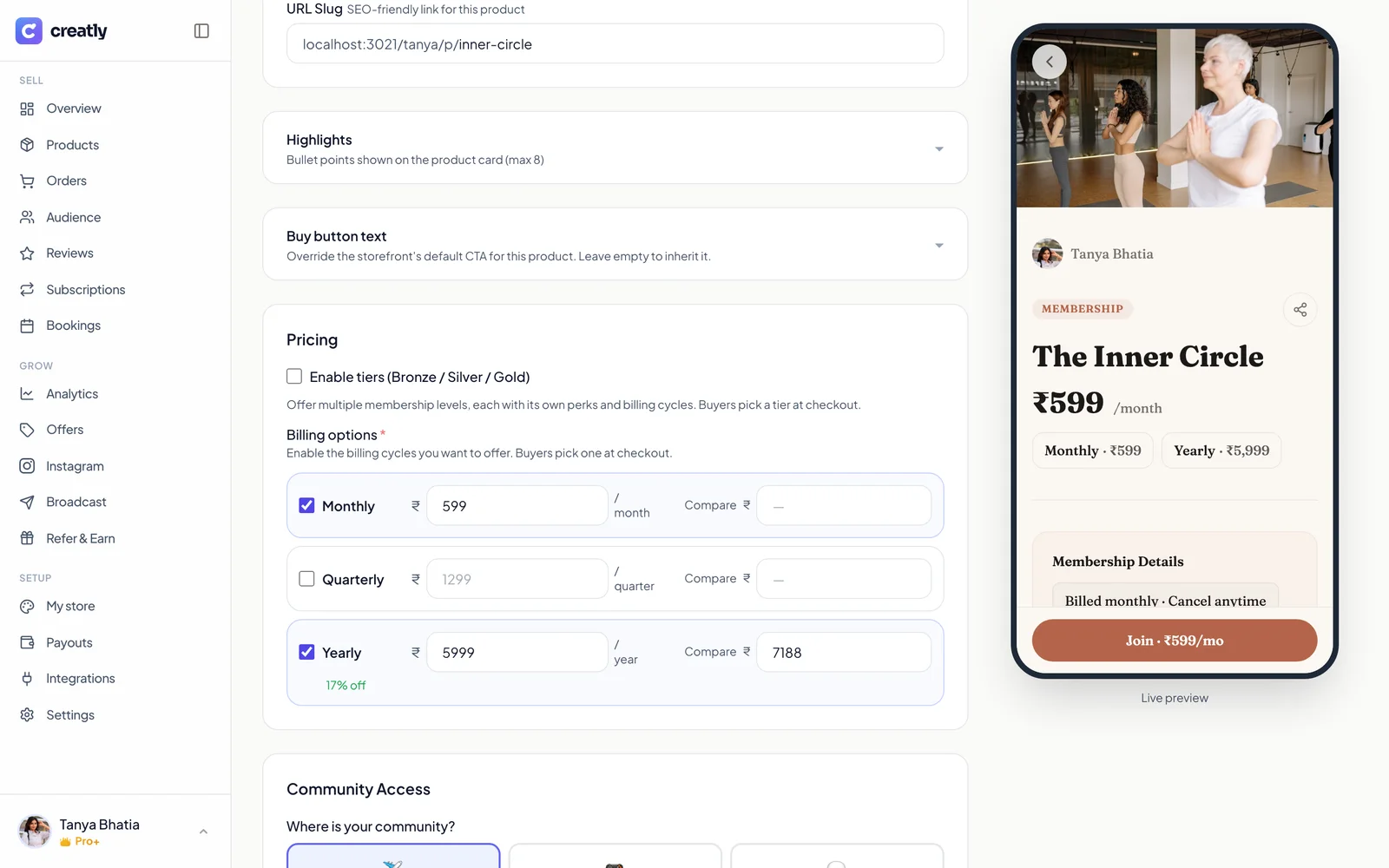
Give the membership a name and enable the billing cycles you want to offer. Monthly, quarterly and yearly can all be on at once, and buyers pick one at checkout. A compare price on the yearly cycle shows the discount automatically, so the maths sells itself. If you want Bronze, Silver and Gold levels with different perks, tiers are one checkbox away, but a single price is the right way to start.
Step 3: Choose where your community lives
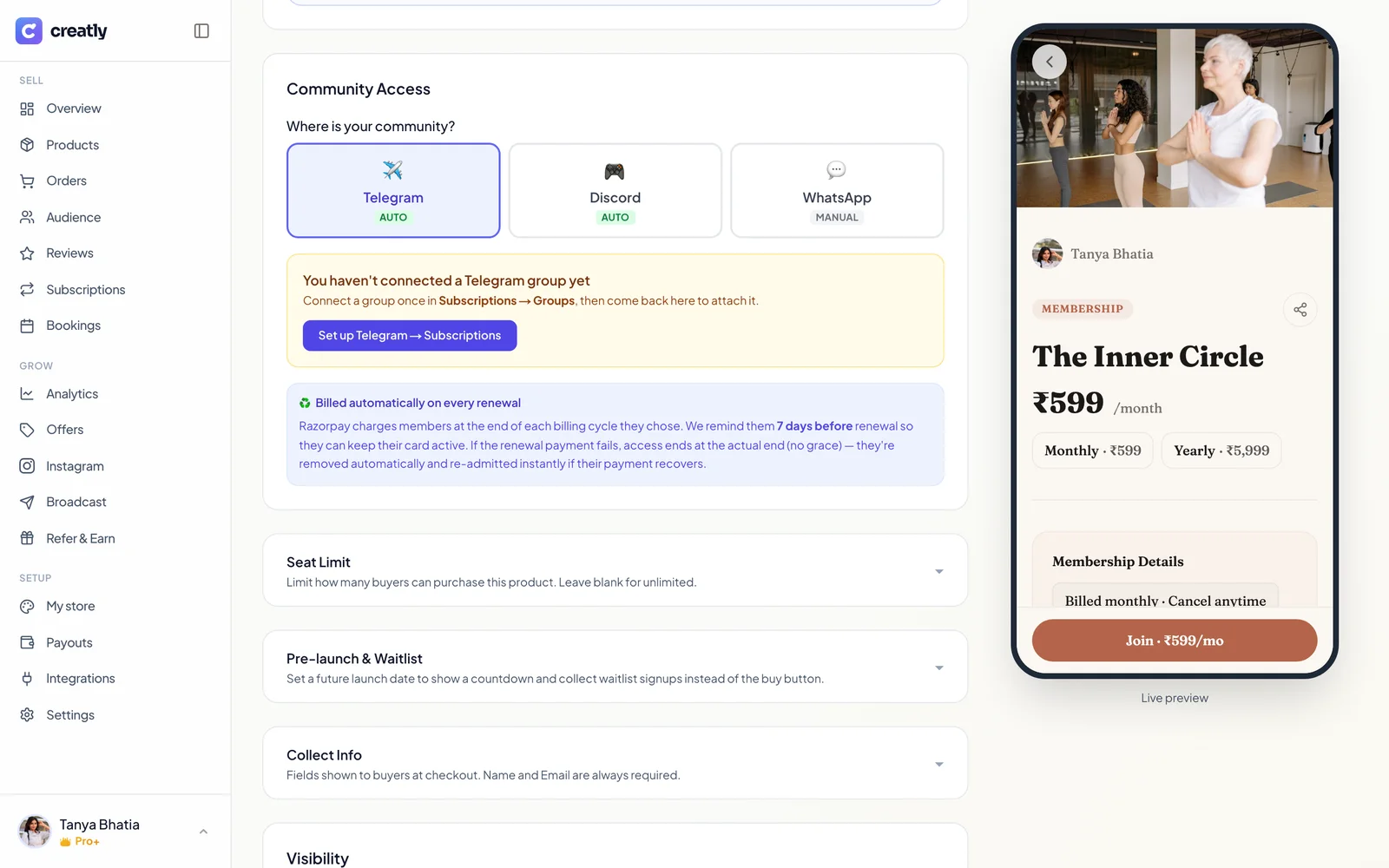
In the Community Access section, pick Telegram. Discord works the same way and is equally automatic. WhatsApp is supported in manual mode because WhatsApp gives no API for managing group members, so be a little suspicious of any tool that promises fully automatic WhatsApp groups.
Step 4: Connect your Telegram group, once
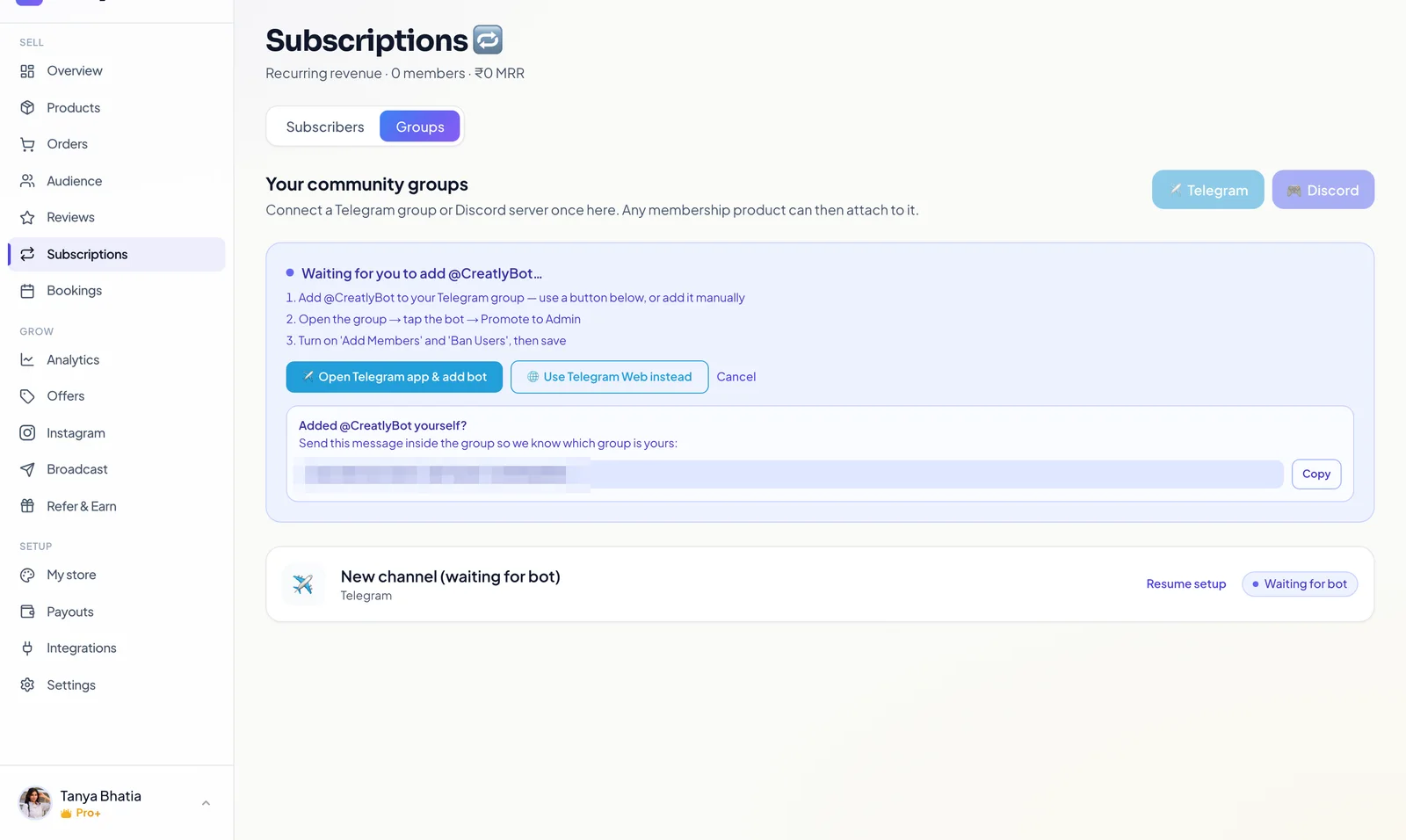
This is the only technical looking step, and it is three taps. Add Creatly’s bot to your Telegram group, promote it to admin, and give it permission to add and remove members. The dashboard walks you through it and detects the group on its own. You connect a group once, and any membership product you create later can attach to the same group.
Step 5: Publish, and put the link where your audience is
Publish the product and it appears on your storefront alongside everything else you sell. Your bio link now does the entire job that DM screenshots used to do.

When a buyer taps through, they see the membership page with your billing cycles, pick one, and pay. From that second, the joins, reminders, renewals and removals run without you.
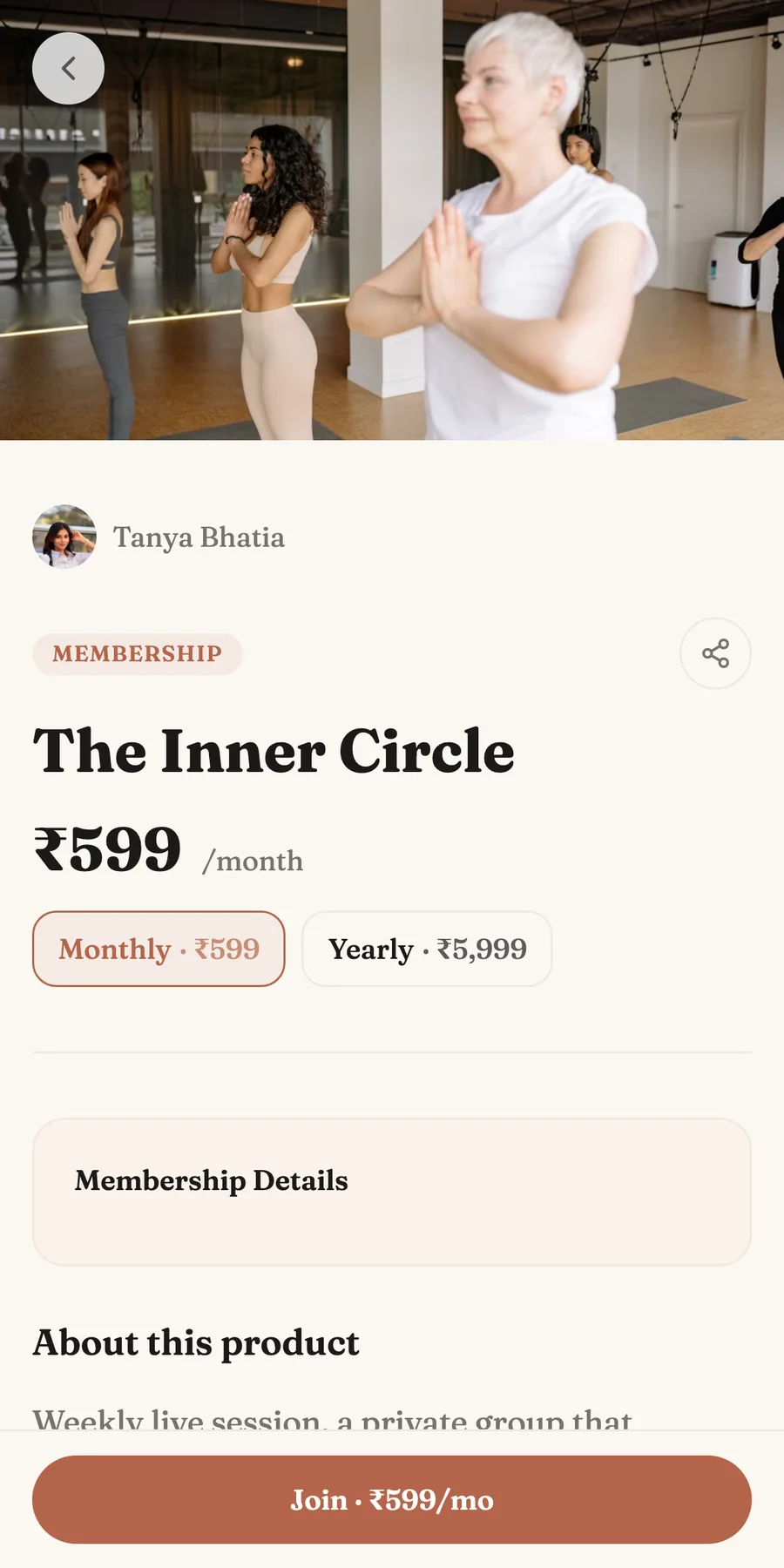
What your members see, from payment to cancellation
Here is the entire journey, end to end. Your follower taps the link in your bio, opens the membership, picks monthly or yearly, and pays by card or UPI. The moment payment clears they get their invite into the Telegram group, and a Creatly buyer account is created for them with the same purchase. That account is where the rest of their relationship lives. They log in any time to see their membership, everything else they have bought from you, and the renewal date coming up.
And when someone wants to leave, they cancel it themselves from their own account. No awkward message to you, no chasing. They keep access for the full period they already paid for, and when it ends the bot removes them from the group quietly. So along with the payment screenshots and the manual adds, the how do I cancel DMs disappear from your inbox too. You run the community. Creatly runs the counter, the door and the exit.
What a paid Telegram community costs
Recurring memberships are a paid plan feature. Pro is ₹499 a month with a 2% fee on sales, and Pro+ is ₹999 a month with 0% on your first ₹1,00,000 of sales each month. The Telegram and Discord automation itself has no extra charge and no per member pricing. At even thirty members on a ₹599 monthly membership, the plan fee is a small slice of community revenue, and the hours you stop spending on admin come back every single week. Full details are on the pricing page.
Frequently asked questions
How do I charge people for my Telegram group?
You need three things working together. A checkout that takes the payment, a bot that lets paying members in, and something that removes them when they stop paying. You can wire this up from separate tools, or use a platform like Creatly where the membership product, the payment and the Telegram access are one setup. The buyer pays on your storefront and the group access follows the payment on its own.
Is it allowed to sell access to a Telegram group?
Yes. Telegram permits private groups with controlled membership, and admitting people through a bot you have made admin is exactly what the platform's bot API is built for. What you are selling is your content and community. Telegram is just where it lives.
How does the member get removed when their subscription ends?
On Creatly, removal is automatic. Renewals are charged by Razorpay at the end of each billing cycle, members get a reminder 7 days before so they can keep their payment method active, and if the renewal fails their access ends and the bot removes them from the group. If their payment recovers, they are re-admitted instantly, with no message to you at any point.
Do my members need to pay by card for a recurring subscription?
Checkout runs on Razorpay, so members can set up the subscription with the payment methods Razorpay supports for recurring charges, including cards and UPI Autopay where available. They pick a billing cycle you have enabled, monthly, quarterly or yearly, and renewals are charged automatically.
What happens when a member wants to cancel?
They do it themselves. Every buyer gets a Creatly account with their purchase, and they can cancel the membership from there whenever they want. They keep access for the full period they have already paid for, and when it ends the bot removes them from the group automatically. You are not involved at any step, and the how do I cancel messages stop reaching your inbox.
Which Creatly plan do I need for a paid Telegram community?
Recurring memberships are available on the paid plans, Pro at ₹499 a month and Pro+ at ₹999 a month. The Telegram automation itself costs nothing extra, and there is no per member charge. The free plan covers one time products like downloads, so if your community is the first paid thing you sell, Pro is where it starts.
Can I run the same setup on Discord or WhatsApp?
Discord works exactly like Telegram, fully automatic. You connect Creatly's bot to your server once and it assigns and removes the member role as payments come and go. WhatsApp groups have no equivalent admin API, so Creatly supports them in manual mode. You get the paid member list and add people yourself.
Selling a course alongside your community? Start here →
Fill the community from Instagram with AutoDM →
Everything Creatly does →