How to Sell E-books on Instamojo: A Beginner-Friendly Step-by-Step Guide
Start Selling Your E-books Online with Instamojo
Want to start your digital product business but don't know where to begin? This easy-to-follow guide explains how to set up your Instamojo account and start selling e-books online.
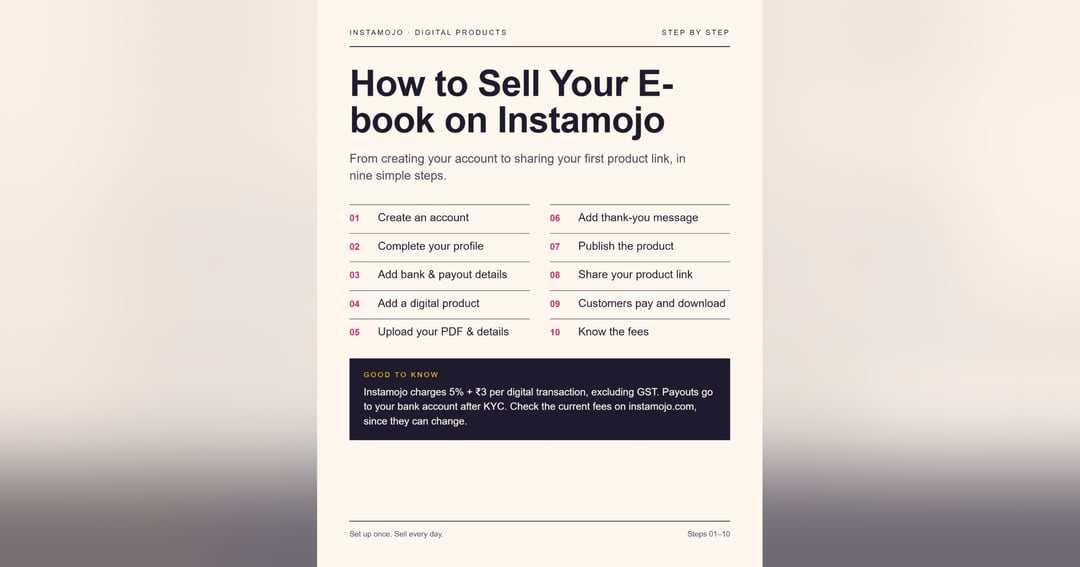
Inside this guide, you will learn how to:
- Create your Instamojo account
- Set up your store profile
- Add bank and payout details
- Create a digital product listing
- Upload your e-book PDF and add product details
- Set your price and customize additional settings
- Publish your product and get your product link
- Share your e-book with potential customers
- Understand the customer payment and download process
Who Is This Guide For?
- Beginners starting an online business
- Aspiring e-book creators
- Digital product sellers
- Students and aspiring entrepreneurs
- Anyone interested in selling PDF products online
This guide presents the process in a simple, visual, step-by-step format, making it easier for beginners to understand how to get started.
Start your digital selling journey with a clear plan and take the first step toward building your online store.
Format: Digital PDF guide
Delivery: Instant digital download
Note: Instamojo features, fees, and policies may change. Check the official website for the latest information.
About the creator

Hello Everyone This is Little E-Book Studio Let's Turn The Journey into Beautiful Part
🏬 Visit storeMore from Little_ebook_studio
Check out other products